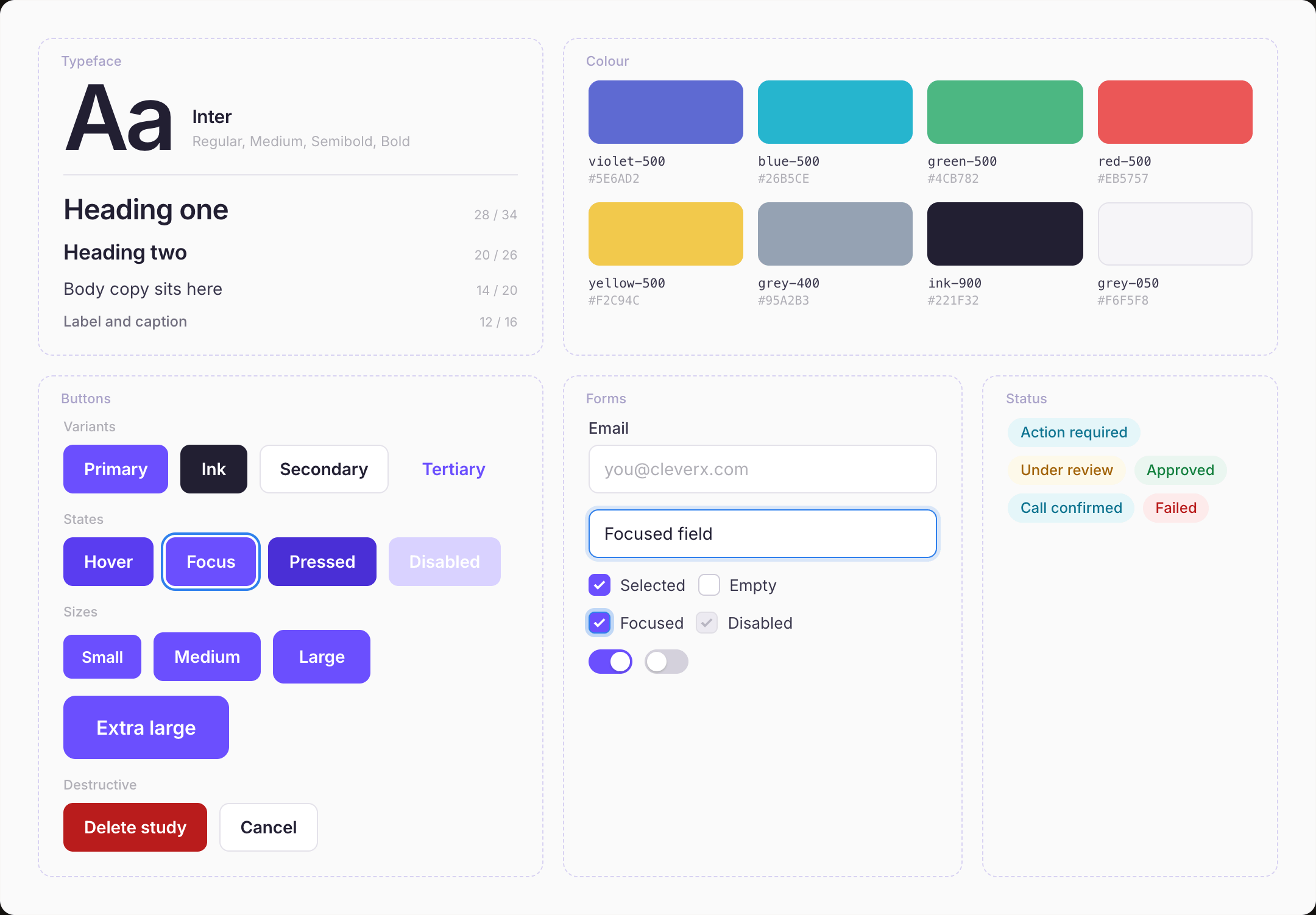
Colour, type, buttons.
These touch every page in the product, so standardising them first bought the widest reach for the least work.
Building a product's first design system when the product already exists, the engineers already have opinions, and nobody has ever opened Figma.
RoleDesigned CleverX design system
OwnershipMaintained design system for 6+ years
StatusStill in production
Year2021
None of that existed when I arrived. Every page had been built by whoever needed that page: the same button drawn five slightly different ways, four purples that were nearly but never the same purple, padding chosen fresh each time. This is what a product looks like when it works and nobody owns how it looks.
The engineers had shipped a working product without a designer. That's not a failure. It's the reason the inconsistency existed. Every page was built by whoever needed it, making reasonable local decisions with nothing global to defer to.
Which meant the system couldn't arrive as a rulebook. Four people had been making these calls for years and were about to be told to stop. It had to be worth adopting, not just correct.
We didn't start by drawing buttons. We ran a brand exercise as a team first, covering vision, mission and values, then chose colours for what they'd communicate rather than what looked current. We checked contrast while picking them, with plugins in Figma, because a palette that fails is a palette you rebuild.
It sounds like a detour. It meant that when someone asked why is the primary violet, there was an answer that wasn't “because I liked it.” Every argument about colour after that was short.
One of those values, that the product should recede and stay out of the way of the work, is the one that later decided how few colours the system could spend.
These touch every page in the product, so standardising them first bought the widest reach for the least work.
The building blocks of study creation, dashboards, and participant management: the pages people actually lived in.
New feature, new component, added to the system rather than built beside it.
The cost was real and I'd take it again: features slipped by days, and in one case by weeks, because we were rewriting production pages onto the new system instead of building what was on the roadmap. Sequencing by blast radius also means the loudest inconsistencies stay visible the longest. You fix the invisible foundation first, and for two months it doesn't look like you've done anything.
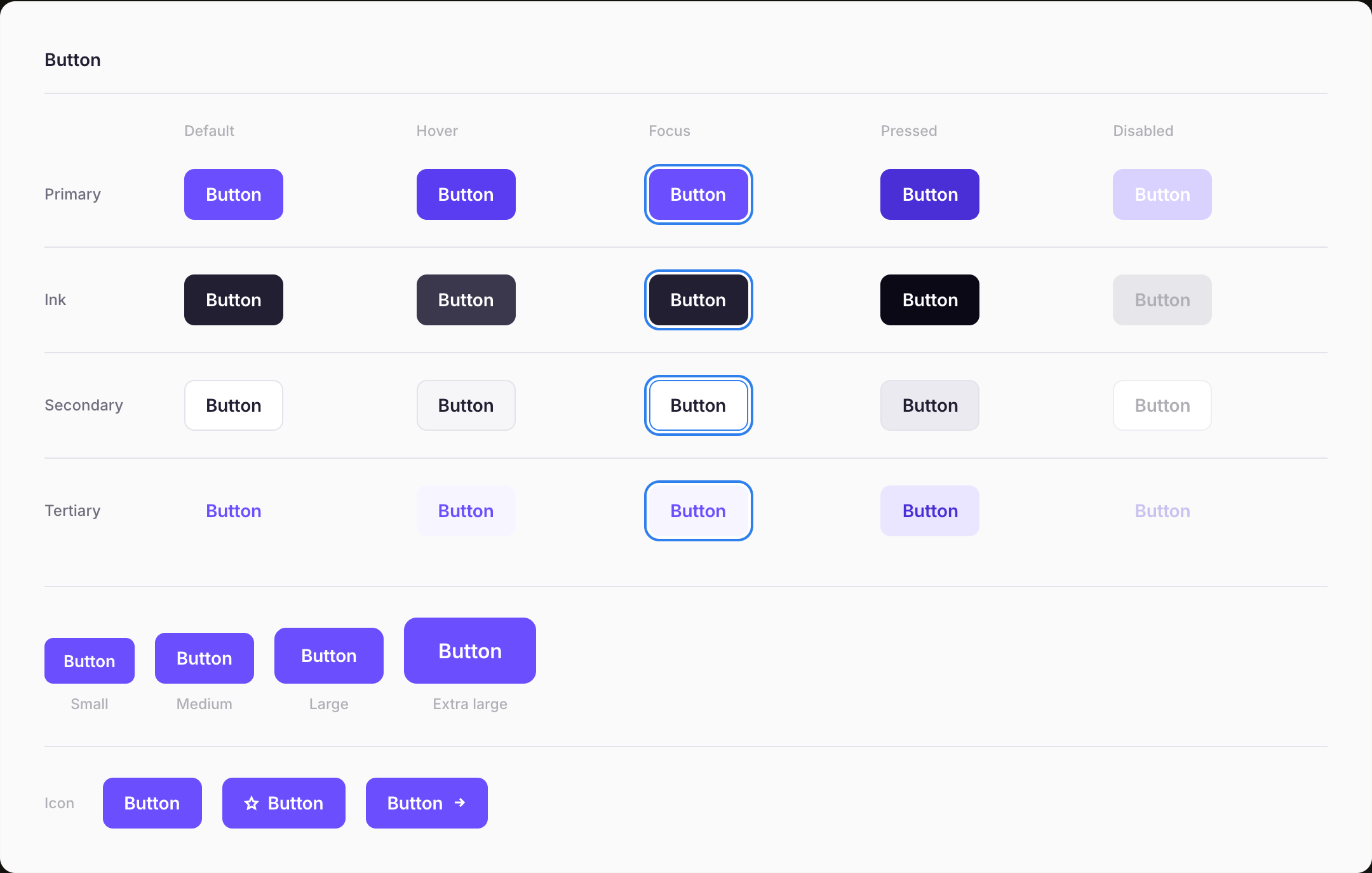
Drawing a button is an afternoon. Deciding what it means, where it goes, and who is allowed to use it is the part that every future page inherits, so getting it wrong compounds across sixty of them.
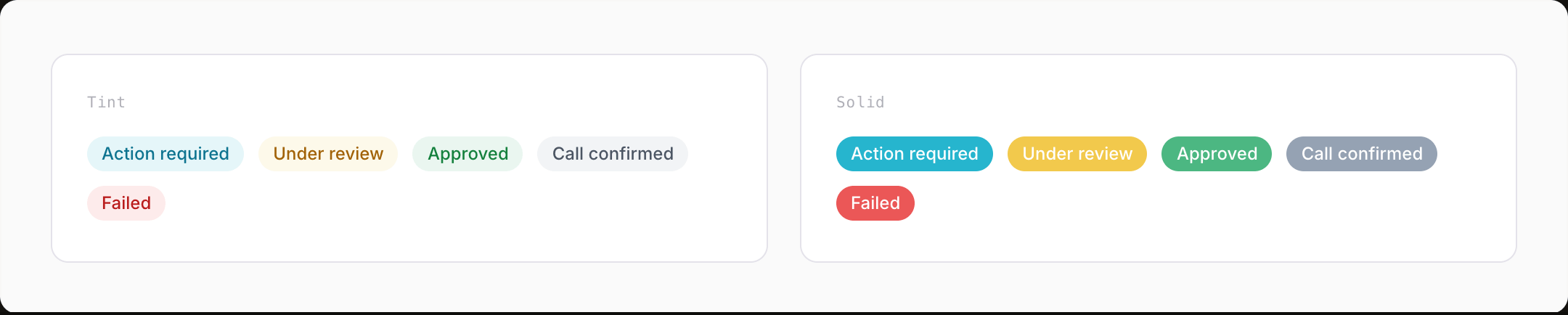
Modals appeared on nearly every page, and we shipped them as one component. That held until the product started needing modals to do different jobs.
Deleting a study isn't the same interruption as confirming one, which isn't the same as reading a notice, which isn't the same as filling in a form. One component was quietly doing four jobs with four button configurations and four tones, and getting all four slightly wrong.
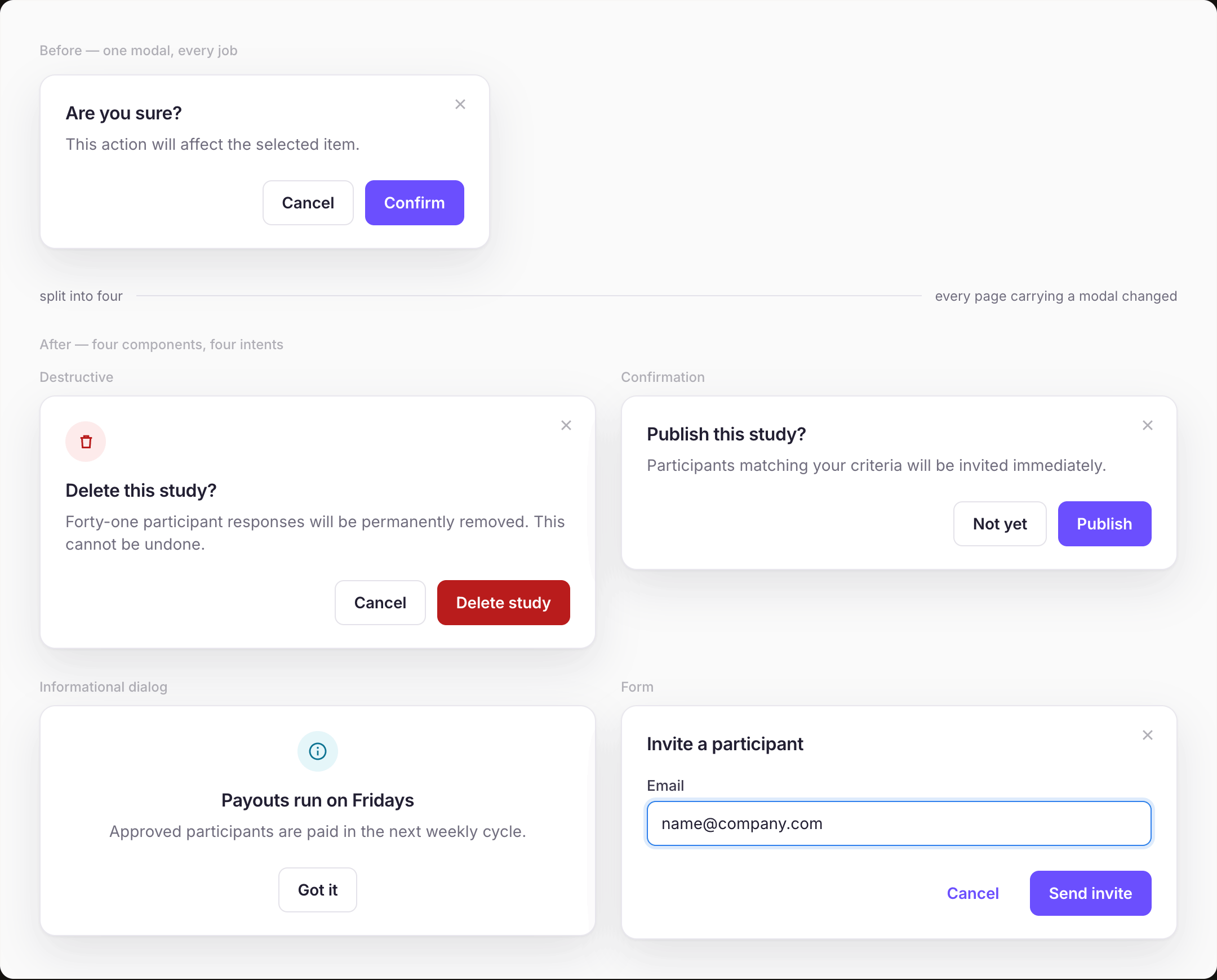
There was no versioning and no migration path. What there was instead: we iterated until the rules held, then sat with the dev team and walked through the reasoning for each split, not the redlines, the why. They updated their components once, and it propagated everywhere in the code.
The honest read is that we shipped the modal before the product had told us what states it needed. Building the general case first felt efficient and wasn't.
The engineers built their own component library in code, mirrored from the Figma system. That was the adoption mechanism and I didn't design it. They did, because they needed something they could import. When the system changed we told them what changed and why, they updated their components, and it landed across the product.
It worked because the sync was human. It was fragile for the same reason.
The place it broke was button text. In Figma the button was the right height; in production it wasn't, because line-height resolved differently in the browser than in the design file. A small bug, except buttons are on every page, so the system's most-used component was visibly wrong everywhere while the Figma file insisted it was fine.
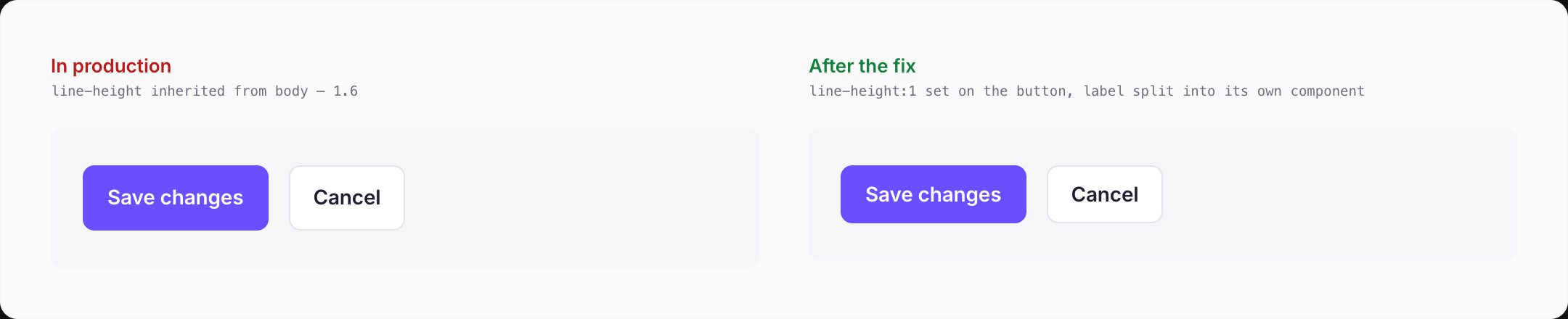
That was the moment the system stopped being a Figma file to me. If what engineers ship doesn't match what I drew, the drawing isn't the system. Theirs is.
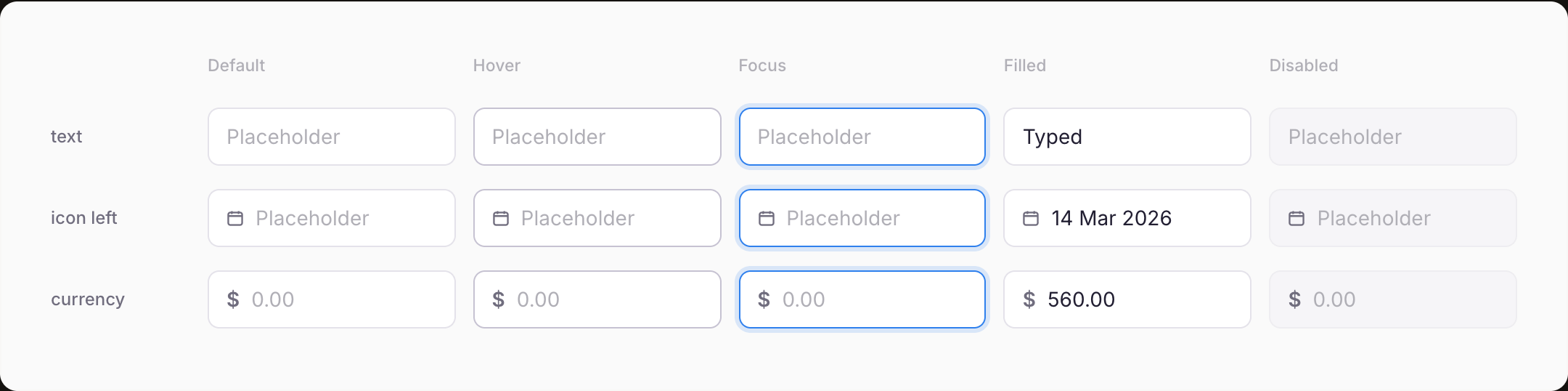
Contrast was checked during palette selection rather than afterwards, which is the only order that works. A palette that fails is a palette you rebuild. Focus states were part of every interactive component's state set from the start, alongside hover and pressed, rather than added when someone asked. Keyboard access was built in.
None of this was heroic. It was cheaper than the alternative, which is finding out at launch.
The whole dashboard was built on the system. Every screen a CleverX customer sees came out of it.
Built and maintained by two designers, consumed by four engineers through a mirrored code library.
Still in production years later — which, for a system built by two people at a startup, is the outcome I'd point at first.
We never instrumented adoption. I know it was total because I could see it in every screen, but “it's everywhere” isn't a number you can take into a roadmap conversation. I'd set up tracking on day one now.
The sync between Figma and the code library was a conversation, not a pipeline. It held because four engineers cared. It wouldn't have held at twelve.
We built ahead of the product more than once. The modal split was the expensive version of that lesson.